Escalation Schedule Item Analysis
Genesis edition only.
The Escalation Schedule Item window displays the value of escalation per schedule item within a project.
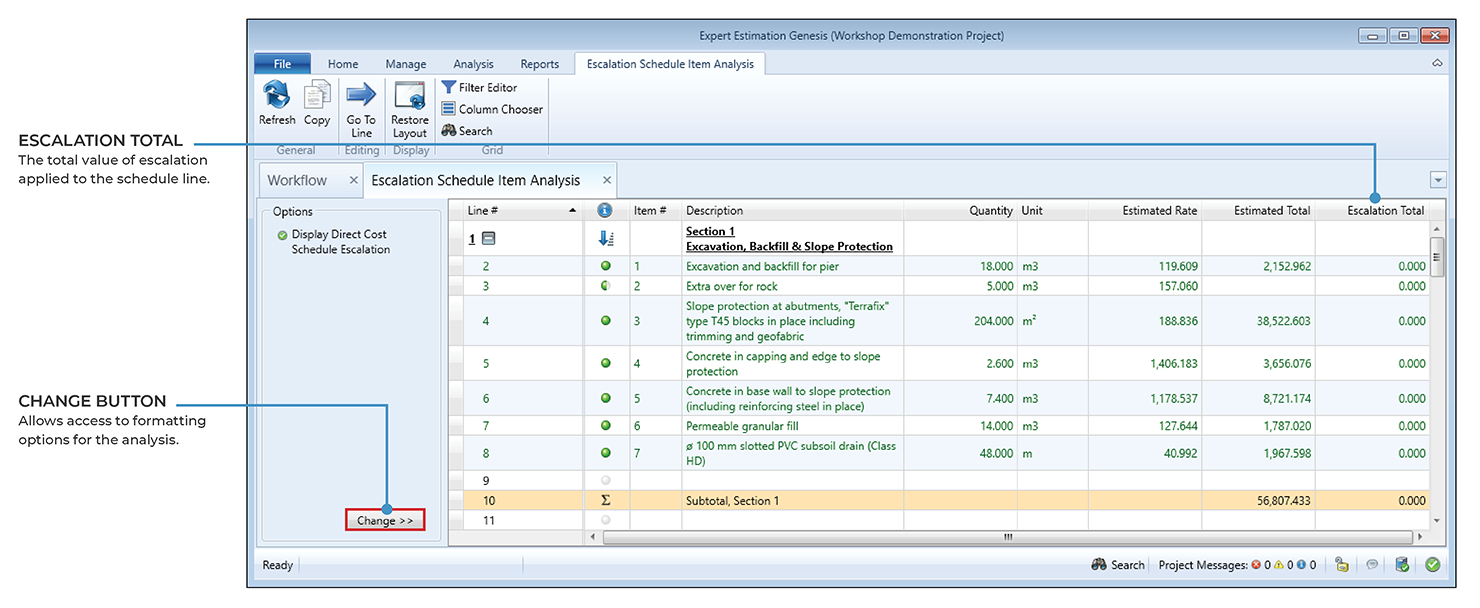
Escalation Schedule Item Analysis window
Before any data can be displayed within the analysis, the Schedule Item Analysis window requires an active Cash Flow Scenario as well as the "Calculate Escalation for the Estimated Cost of the Project" option to be enabled from within the Cash Flow Sceario Options – Escalation window.
By default, the analysis will display the Estimated Value of the Direct Cost Schedule with the Total Escalated Value for each item. The escalation value per Resource Type can be shown by adding Resource Type specific columns from the Column Chooser.
Note: The analysis will show only combined escalated totals for each item. The escalation value per resource is displayed within the Escalation Value columns in the Resource Explorer.
FORMATTING OPTIONS
You can change the format of the data displayed by clicking the Change >> button, in the bottom left-hand corner in the Options section of the analysis window.
|
OPTION |
DESCRIPTION |
|---|---|
|
Show Direct Cost Schedule Escalation |
This option displays the Escalation Value for each Direct Cost Schedule Item available in the project. |
|
Show Overhead Cost Schedule Escalation |
This option displays the Escalation Value for each Overhead Cost Schedule Item available in the project. |
Note: Only one Cost Schedule can be selected at a time.