Project Summary – Margin Calculations
Expert Estimation allows you to generate and record profit for your project. In Excelerate you are limited to a single margin type, and have access to up to 7 margin types in Express and Genesis.
Two margin types are defined by default, known as Overall and Corporate Margin, and are both applied as percentages from within the Project Summary window.
Additional margins can be included, and each margin type renamed in the project from the Project Properties – Calculations window.
Overall Margin allows you to record your profit margin for the project and is the most common way to generate margin for a project. Corporate Margin is used in conjunction with the Overall Margin and can represent a company standard margin that needs to be applied.
Each of these margins can be configured to generate a total contributing margin based on either the Total Estimated Costs of the project or the final Project Total.
|
NAME |
DESCRIPTION |
|---|---|
|
On Total Costs |
Margins by default are set to on Total Cost and will mark up the Total Costs of the project by the specified percentage. |
|
Of Project Total |
Margins set to of Project Total will generate margin by the specified percentage of the final Project Total. |
|
On Escalated Total Costs |
Margins set to on Escalated Total Costs will mark up the Total Costs of the project, including any Escalation, by the specified percentage. Note: On Escalated Total Costs is only available when escalation has been enabled in the Cash Flow Scenario Options - Escalation window. Genesis edition only. |
Each margin is calculated independently and included in the project rather than being combined first and the calculated. However, the project can combine calculations when calculating margin of Project Total. This setting is definable in the in the Project Properties - Calculations window.
ON TOTAL COST
The on Total Cost markup generates margin based on a percentage of the Total Costs. This is the default margin type and is calculated by entering a percentage, which is used to calculate a factored amount of the project’s Total Costs.
The image below shows the Total Cost of the project as $100,000 (highlighted in dark blue) and the markup percentage is 10% on Total Cost (highlighted in light blue). The resulting margin value is $10,000. This value acts as the Total Margin for the Project. It is this Total Margin plus the Total Costs that are then added together to achieve the final Project Total of $110,000.

Calculating margin based on Total Cost
The formula below shows how the total value of margin is calculated when using the margin type on Total Cost:
- TC% = The percentage specified on Total Cost = 10%
- TCV = Total Cost Value = Direct Total + Overhead Total + Risk and Opportunities Total + Preadjustments Total = $100,000

OF PROJECT TOTAL
The percentage of Project Total markup differs from on Total Cost by calculating the value of margin where it represents a percentage of the overall contract, rather than a percentage on top of the total cost of the project.
Essentially, if the of Project Total percentage is set to 10%, then that line of margin will represent 10% of the project or contract.

Calculating margin of Project Total
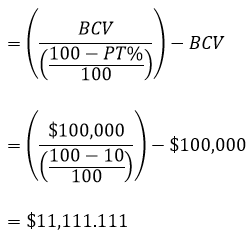
The formula below shows how the total value of margin is calculated when using the margin type of Project Total:
- PT% = The percentage specified of Project Total = 10%
- BCV = Base Contract Value = Total Cost Value + Direct Costs Margin + Overhead Costs Margin + Risk and Opportunities Margin + Preadjustments Margin + Provisional Sums Margin + Post margin Adjustment + Specific Margins + Margin Adjustment + Provisional Sums Total (if Calculation option has been set) = $100,000