Spread Allocations - Properties Pane
The Properties pane for the Spread Allocations window displays information for the Hidden and Overhead item that is currently selected. It represents the same data displayed in the Spread Allocations window in a different format, having the benefit of providing summary information for multiple selected items alongside a breakdown of the items receiving the allocated value.
This pane can be opened in a number of ways:
- Click the Properties (
 ) icon from the Spread Allocations - Ribbon Toolbar
 - Using the keyboard shortcut Alt+Enter
The Properties pane will be displayed (by default) to the right-hand side of the Spread Allocations window, and can be detached and repositioned wherever needed around the screen.
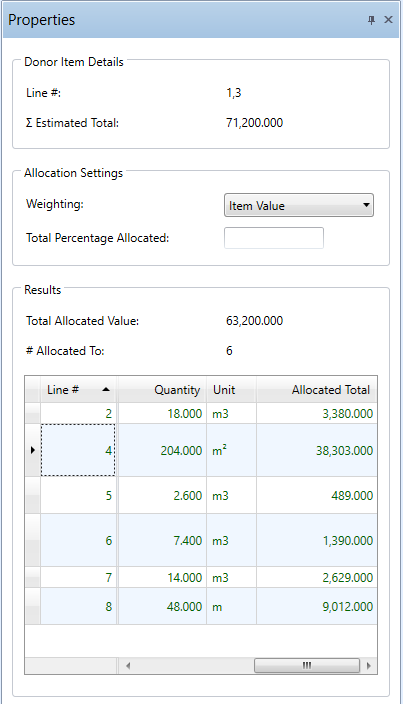
Spread Allocations Properties pane
AVAILABLE FIELDS
Numerous Overhead and Hidden line properties can be seen from the Properties pane. Some are read-only and provide summations of multiple selected items. Others are editable, for both single and multiple selected items. These properties include:
DONOR ITEM DETAILS
This section allows you to see the line and total value information about the item(‘s) currently selected
- Line #
- Σ Estimated Total
ALLOCATION SETTINGS
This section allows you to control the Spread Allocations weighting options.
- Weighting Type
- Total Percentage Allocated
RESULTS
This section will display the following result information of the allocations assigned to the selected lines:
- Total Allocated Value
- # Allocated To
Note: ( ) will be displayed against the Total Allocated value if any of the allocations are invalid.
The following Direct Cost Line Item information will be displayed in a table format:
- Line #
- Item #
- Description
- Quantity
- Unit
- Allocated Total